

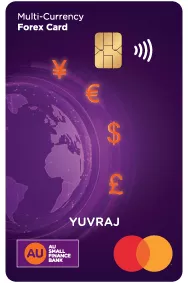


Multi-Currency Flexibility
Load up to 6 currencies – USD, EUR, CAD, GBP, AED and JPY

Worldwide Acceptance
Worldwide acceptance at multiple ATMs & Merchants

Intelligent Fund Utilization
Your card automatically uses the correct currency wallet to optimize spending

Lock-in Exchange Rates
Avoid currency fluctuations by fixing your rate
before you travel

Retain Unspent Balance
Retain your unspent balance and enjoy hassle-free spending on your next trip

Card Insurance
Complimentary insurance coverage that protects you against unforeseen events


Emergency Cash Assistance
With emergency cash service, receive local currency delivered directly to your location outside India

Duty-Free Shopping at Airport
Use your unspent balance to shop duty-free at Indian airports

Advanced Security
Enjoy secure payments with 3D secure Chip & PIN technology

24x7 Value Added Services
Enjoy value added services like emergency cash assistance, embassy support and more


Things to know
Eligibility
- The Forex Card is available to Indian nationals traveling abroad and foreign nationals residing in India. It can be issued to customers who maintain an account with AU Small Finance Bank.
- Forex Card cannot be issued to NRI/NRE/NRO/non-KYC compliant customers. It can be issued to Indian residents and foreign nationals residing in India only.
- Your PAN Card should be updated in the bank records
Fees & Charges
Schedule of Charges and fee applicable
| Particulars | Charges |
| Load Fee | INR 150 |
| Reload Fee | INR 100 |
| Refund Fee | INR 100 |
| Card Replacement Fee | INR 100 |
| Cross Currency Fee (Mark-up fee)* | 3.50% |
| Wallet to Wallet Transfer Fee | 2% of transfer amount |
| Fee for Uncapped ATM Withdrawals | 1% of withdrawal amount |
| Charge Slip Retrieval Fee | USD 2.00 |
| Cash Over the Counter Fee | 1.75% of the transaction value |
(Kindly note Exchange rates mentioned are indicative & are subject to change as required based on market fluctuations The final rate applicable unless mentioned will be the card rate prevailing at the time debit /credit to the account of the client)
- GST as applicable on all Fees and Charges
- Tax Collected at Source (TCS) is applicable under the provision of Financial Act, 2020.
- Currency Conversion GST will be applicable at the time of currency conversion from INR currency to foreign currency and vice versa.
- All fees and charges mentioned above are exclusive of taxes. In case of insufficient balance on particular wallet, fee along with taxes will be debited from the highest order wallet with sufficient balance.
- *Cross Currency Mark-up charges
a) For transactions where the transaction currency is different than the currency available on Forex Card Bank will charge Cross Currency Mark-up on such transactions as applicable.
b) Exchange rate used will be the Visa / MasterCard wholesale exchange rate prevailing at the time of the transaction. Exchange rate used will be the Mid-rate prevailing at the time of the transaction.
c) For cross currency transactions involving wallet to wallet transfers within currencies available on the Forex Card, customer will be charged cross currency mark-up as applicable.
d) GST will be applicable on Currency Conversion & other fees as per prevailing rate.
e) Applicable GST on Currency Conversion, TCS and other taxes will be debited from your account on the next working day from the date of request.
Daily Limit & Fees / Charges of (ATM & POS)
| Currency | ATM Withdrawal Limit | POS and Online Limit | Contactless Payment | ATM Cash Withdrawal Fee* | Balance Enquiry Fee* |
| US Dollar (USD) | USD 5,000 Equivalent | USD 10,000 Equivalent | USD 50 Equivalent | USD 2.00 | USD 0.50 |
| British Pound (GBP) | USD 5,000 Equivalent | USD 10,000 Equivalent | USD 50 Equivalent | GBP 1.50 | GBP 0.50 |
| Euro (EUR) | USD 5,000 Equivalent | USD 10,000 Equivalent | USD 50 Equivalent | EUR 1.50 | EUR 0.50 |
| Canadian Dollar (CAD) | USD 5,000 Equivalent | USD 10,000 Equivalent | USD 50 Equivalent | CAD 2.50 | CAD 0.50 |
| Japanese Yen (JPY) | USD 5,000 Equivalent | USD 10,000 Equivalent | USD 50 Equivalent | JPY 250.00 | JPY 60.00 |
| United Arab Emirates Dirham (AED) | USD 5,000 Equivalent | USD 10,000 Equivalent | USD 50 Equivalent | AED 7.00 | AED 1.00 |
*All fees and charges mentioned above are exclusive of taxes. In case of insufficient balance on particular wallet, fee along with taxes will be debited from the highest order wallet with sufficient balance.
Exchange rates mentioned are indicative & are subject to change as required based on market fluctuations The final rate applicable unless mentioned will be the card rate prevailing at the time debit /credit to the account of the client
Transaction Limits
| Limits | Amount |
| Minimum amount you can load on your Card | USD 100 other currencies can be loaded equivalent |
| Limit of amount that can be loaded on Forex Cards as per Liberated Remittance Scheme | Maximum USD 250,000 or equivalent in any other currency in a financial year |
Exchange rates mentioned are indicative & are subject to change as required based on market fluctuations The final rate applicable unless mentioned will be the card rate prevailing at the time debit /credit to the account of the client.
Terms & Conditions
· Click here to view terms and conditions for AU Multi-Currency Forex Card
· Click here to view terms and conditions for Emergency Cash Assistance
· Click here to view terms and conditions for Card Insurance
· Terms & Conditions for Value Added Services
Servicing Branches
Click here to view Forex Card Servicing Branches


Why AU
-

National presence
Bank with us through a network of 3,000+ touchpoints.
-
Get a bit more
Enjoy quality services at competitive rates.
-
Visit branches without the wait
Our ample touchpoints ensure all our customers are conveniently served.
-
Superfast app
Manage and track all your transactions on the AU 0101 App.
-
Sustained growth
Expanding by every quarter, with a balance sheet of over ₹1 lakh crore.

Bank anywhere anytime, on the AU 0101 mobile app
-
![View balance and transactions]() View balance and transactions
View balance and transactions
-
![Download account statement]() Download account statement
Download account statement
-
![Request cheque book]() Request cheque book
Request cheque book


 40+ lakh customers banking on app
Not sure which product is right for you?
-
![]() Personal assistance
Personal assistance
-
![]() No spam
No spam


Customer support
24x7 help
Frequently Asked Questions (FAQs)
What is the AU Multi-Currency Forex Card?
It is a prepaid card that can be loaded with multiple foreign currencies. You can lock in exchange rates in advance and avoid currency fluctuations while traveling abroad. Currently, you can load up to 6 currencies on the AU Multi-Currency Forex Card: Canadian Dollar, Euro, British Pound, UAE Dirham, US Dollar, and Japanese Yen.
Which 6 currencies can be loaded onto the AU Multi-Currency Forex Card?
You can load:
Canadian Dollar (CAD), Euro (EUR), British Pound (GBP), UAE Dirham (AED), US Dollar (USD), and Japanese Yen (JPY).
Do I need to have an AU Small Finance Bank account to get the AU Multi-Currency Forex Card?
Yes. You currently need an AU Small Finance Bank account to apply for the AU Multi-Currency Forex Card. To begin, simply log in to https://www.au.bank.in/ and follow the easy steps.
Can I reload the AU Multi-Currency Forex Card anywhere, anytime?
Yes. You can reload the card online through our customer portal or by visiting any AU Multi-Currency Forex Card servicing branch.
If you are abroad and want someone in India to reload your card, you may leave a signed reload form and an authorization letter with a family member. They can submit these at any servicing branch. Once documents and funds are verified, your card will be reloaded.
What is the minimum amount that can be loaded on the card?
The minimum load amount is 100 units of the currency you wish to load (USD/GBP/EUR/JPY/AED/CAD).
What should I do if an ATM asks for a 6-digit PIN?
Simply enter your existing 4-digit PIN and press Enter/Confirm.
Even if the ATM screen asks for 6 digits, it will accept your 4-digit PIN.
How do I withdraw cash from an ATM?
You can withdraw cash using your AU Multi-Currency Forex Card at any ATM displaying the Mastercard logo.
Steps:
1. Insert your card and enter your 4-digit PIN.
2. Select Cash Withdrawal or Balance Enquiry.
3. Choose the account type: Checking / Current / Credit (any option works).
4. Collect your cash and card.
Important Notes:
Some countries/banks may charge additional fees on foreign cards as per their local rules.
If cash withdrawal fails, try:
Entering a lower amount (ATMs may have lower local limits)
Retrying after a few minutes (network issues are common)
Some overseas ATMs may charge an additional ATM surcharge.
This fee is not levied by AU Small Finance Bank and cannot be reversed.
Surcharge is charged by the foreign bank/ATM owner in addition to AU Bank fees.
How do I use the card at merchant outlets?
The merchant will swipe or dip your AU Multi-Currency Forex Card at the POS terminal.
Steps:
1. Select Credit / Checking / Current as the account type.
2. Ask the merchant to select “Pay in local currency” to avoid DCC charges^.
3. Enter your 4-digit PIN (only at Chip & PIN terminals).
4. Sign the merchant copy of the receipt (where required).
5. Collect your card, customer copy, and invoice.
How can I use the card online?
You can use your AU Multi-Currency Forex Card for online shopping and payments across international websites.
To ensure secure usage, please enable your card for E-commerce / POS / ATM through the customer portal.
Steps:
1. Log in to the merchant’s website.
2. Choose Debit/Credit Card as the payment option.
3. Enter your card details and billing information.
4. Confirm and make the payment.
What is the minimum age to get an AU Multi-Currency Forex Card?
The card can be issued to resident individuals aged 12 years and above.
If the applicant/remitter is a minor, Form A2 must be countersigned by the minor’s natural guardian.
What is the difference between Cross Currency and DCC?
Feature | Cross Currency | Dynamic Currency Conversion (DCC) |
Trigger | Spending in a currency not loaded on the card | Merchant/ATM offering payment in INR |
Conversion Point | Card issuer or network | Merchant’s POS/ATM system |
Control | Automatic | Customer chooses (but should decline) |
How long does it take to process load, reload, and refund requests for my AU Multi-Currency Forex Card?
Processing Time:
Requests received before 4:30 PM (IST) on a working day will be processed on the same business day, subject to successful verification.
Requests After Cut-off:
Requests received after 4:30 PM (IST) or on bank holidays will be processed on the next working day.
Delays:
In case of technical or processing delays, the transaction may be completed on the next working day.
What documents are required to purchase or reload my AU Multi-Currency Forex Card at a branch or online?
Mandatory Documents:
· Copy of your Passport
· Filled Application Form
Optional / If Applicable:
· Purpose of Travel documents
Additional Information:
· Ensure your PAN is updated in the bank’s records.
· Document requirements may vary based on the selected purpose code.
· AU Small Finance Bank may update the document list as per regulatory guidelines.
· If applying at a branch, please carry your original KYC documents along with self-attested copies.
Are there any restrictions on the usage of the card in any country or currency?
Yes. The AU Multi-Currency Forex Card must not be used in India, Nepal, or Bhutan for making payments in foreign currencies.
The card is also prohibited in countries classified as high-risk by the RBI or those listed under the Bank’s Sanctions Policy. Usage in sanctioned countries is strictly not allowed.
For the latest list of sanctioned countries and territories, please click here.
Can the remaining foreign exchange balance be retained after returning to India?
Yes, as per RBI guidelines, you may retain the card if the balance is less than USD 2,000.
If the balance exceeds this amount, a refund must be requested within 180 days of your return to India.
Are there any student offers on the card?
Yes. Students can avail:
- Emergency Assistance Services from Across Assist, and
- Exclusive benefits through ISIC (International Student Identity Card).
For the latest student offers, please click here.
Can the card be used for Internet or MOTO (Mail Order–Telephone Order) transactions?
No. The card cannot be used for Internet-based (E-commerce) or MOTO transactions.
How can I apply for a refund of the card balance?
You can apply for a refund only after returning to India.
Additionally, the last transaction must have been completed at least 10 days prior, or there should be no pending settlements on the card.
Refund options:
- Visit the AU Multi-Currency Forex Card customer portal, or
- Visit any servicing AU Small Finance Bank branch.
You will need to fill the refund form and submit a copy of your passport.
How many times can the AU Multi-Currency Forex Card be reloaded?
The card can be reloaded multiple times before its expiry, subject to RBI/FEMA load and reload limits.
What can I use this card for?
You can use the card for almost all your international travel needs, including:
- Travel bookings
- Dining
- Hotel reservations
- Shopping
- Duty-free purchases
- Entertainment, and more.
What should I do if my AU Multi-Currency Forex Card has expired but there is an unutilised balance?
You can:
- Apply for a replacement card to use the remaining funds, or
- Visit any AU Small Finance Bank branch to request a refund of the balance.
Do I need to activate my card for e-commerce transactions?
Yes.
E-commerce and contactless transactions are disabled by default as a security measure.
You can enable/disable these channels and set transaction limits through:
- The AU Multi-Currency Forex Card Customer Portal, or
- Any AU Small Finance Bank servicing branch.
It is recommended to enable these channels before making an online payment.
Are there any offers available on my card?
Yes. For the latest offers, kindly click here.
At what exchange rate can I load currency on the card?
The card is loaded at the exchange rate offered by the bank on the day of the transaction.
Can I start using the AU Multi-Currency Forex Card immediately upon receiving the card kit?
You can start using your AU Multi-Currency Forex Card once it is activated.
Activation may take up to 24 hours after the bank receives your funds and required documents.
In most cases, activation is completed within 4–7 hours, and you will receive an SMS or email update.
You can also check the activation status through Phone Banking.
You can apply for the card up to 180 days before travel or even on the day of travel, as it is an over-the-counter product. However, we recommend applying a few days earlier to avoid last-minute delays.
Can I transfer money from my Forex Prepaid Card back to my bank account?
Yes. The remaining balance can be refunded to your AU Small Finance Bank account.
If I am traveling to two different countries, can I load two different currencies on the same card?
Yes. The AU Multi-Currency Forex Card can hold up to 6 currencies (Canadian Dollar, Euro, British Pound, UAE Dirham, US Dollar, Japanese Yen) on a single card.
You can use the respective currency wallets seamlessly at ATMs, merchant outlets, and online platforms that accept Mastercard.
Please Note:
The total amount loaded across all currencies must comply with the prevailing RBI and FEMA guidelines.
Does DCC apply to ATM withdrawals too?
Yes. Some ATMs may offer DCC during cash withdrawals.
Always choose to withdraw in the local currency to avoid extra charges.
Can AU Small Finance Bank reverse DCC charges if I accidentally select INR?
No. AU Small Finance Bank cannot reverse DCC-related charges, as these are levied by the merchant/ATM operator, not by the bank.
How do I know if DCC is being offered during a transaction?
You may see prompts such as:
- “Would you like to pay in your home currency (INR)?”
- “Choose currency: INR or Local Currency”
- “Card issued in India – convert to INR?”
Best Practice:
Always decline these options and choose the local currency.
Can I use the DCC option while using my AU Multi-Currency Forex Card?
It is not advisable to choose DCC.
Selecting DCC causes your transaction to go through two currency conversions, increasing your cost.
Also note: Cross-currency transactions attract currency conversion charges at applicable rates.
What is Cross Currency?
Cross currency occurs when you spend in a currency not loaded on your AU Multi-Currency Forex Card.
Example:
Your card is loaded with USD, but you pay in EUR.
The system converts EUR → USD using the card issuer’s exchange rate.
Charges:
A cross-currency markup is applied in addition to standard forex markup.
What is Dynamic Currency Conversion (DCC)?
DCC is a feature offered by some overseas merchants, ATMs, or POS machines that lets you pay in INR instead of the local currency.
Example:
A terminal abroad may ask:
“Do you want to pay in INR instead of USD/EUR?”
Choosing INR means the merchant converts the amount at their own rate and may add fees.
Impact:
This causes double conversion (Local Currency → INR → Loaded Currency), making your transaction more expensive.
Best Practice:
Always decline DCC and pay in the local currency.
Can I use my AU Multi-Currency Forex Card on Uber and Lyft?
Yes, you can. Follow these steps for smooth usage:
- Uninstall and reinstall the Uber/Lyft app once you are abroad.
- While re-registering, use your current location and a mobile number with international roaming enabled.
- Ensure the ECOM (e-commerce) facility on your AU Multi-Currency Forex Card is enabled.
- If a payment fails, you may contact Uber’s toll-free support and request them to unblock your card. If needed, mention that your card is a credit card (for acceptance purposes).
- For a seamless experience, you can also add funds to your Uber Cash Wallet from your AU Multi-Currency Forex Card.
Do I need a new 6-digit PIN before traveling?
No. You do not need a new PIN. Your existing 4-digit PIN will work at ATMs abroad.
What is a PIN?
Your PIN (Personal Identification Number) is a unique 4-digit code assigned to your card. It is required for ATM withdrawals, Cash at POS, and some merchant transactions.
PIN requirement may vary by country—some places prefer PIN entry, while others may use signature verification.
Can I load multiple currencies on the AU Multi-Currency Forex Card?
Yes, you can load more than one currency. The card currently supports up to 6 currencies: USD, EUR, CAD, GBP, AED, and JPY.
Where can I use the AU Multi-Currency Forex Card?
You can use it to:
Withdraw cash from ATMs
Make purchases at POS terminals
Pay online for e-commerce or digital transactions
The amount is directly deducted from your card balance.
How secure is the AU Multi-Currency Forex Card?
The card comes with an embedded EMV chip that provides high-level security for merchant payments. It also has a magnetic stripe for added reliability. The card works independently of your bank account and carries no personal details, ensuring safety and privacy.
How can I apply for the AU Multi-Currency Forex Card?
You can apply through our website. You may also visit any of our AU Multi-Currency Forex Card servicing branches to get an Instakit. The process requires minimal documentation and is fast, simple, and seamless.


